Use Your iPhone as a Microphone for Your Mac
MicCarry makes the phone on your desk a clear, low-latency wired microphone for any Mac app — dictation, meetings, recording, streaming. Plug in, tap Start, talk in five minutes.
Free Mac companion · 30-day free trial on iPhone · $4.99 once, no subscription
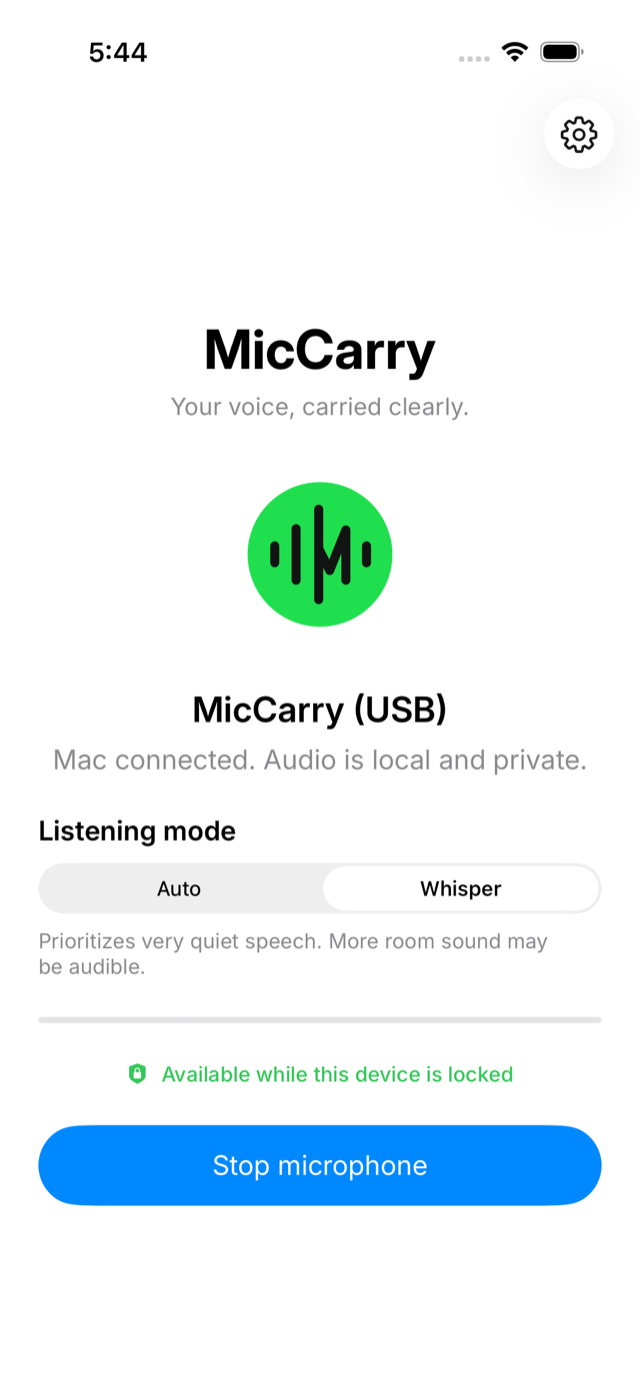
What is MicCarry?
MicCarry is an iPhone app and a free Mac companion that turn your iPhone into a wired USB microphone for your Mac. Connect the two with a USB-C cable, tap Start microphone on the phone, and "MicCarry (USB)" appears as a normal input in every Mac app — Zoom, Meet, dictation tools, Voice Memos, streaming software. Unlike Apple's Continuity Camera, MicCarry requires no shared Apple Account, so it works between a work Mac and a personal iPhone. Audio travels only over the cable with temporary encryption; normal sessions are not recorded, and there is no MicCarry account or cloud audio. It requires an iPhone with USB-C and an Apple Silicon Mac, and costs $4.99 once after a 30-day free trial — the Mac companion is always free.
From box to first audio, honestly timed
No network setup, no pairing codes, no account requirements. Six steps, and every one of them shows you its true state.
Designed for first audio in under five minutesOpen MicCarry on your iPhone
One promise on one screen: use this iPhone as your Mac's microphone. Nothing starts until you say so.
~10 secondsInstall the free Mac companion
One signed and notarized package installs MicCarry and adds "MicCarry (USB)" as a normal input on your Mac.
~2 minutesConnect the cable
The same USB-C cable you charge with. The app shows the exact cable state — never a spinner that lies.
~5 secondsTap Start microphone
iOS asks for microphone permission — once, explicitly. Capture begins only with your tap, never from the Mac.
~15 secondsPick "MicCarry (USB)" in your app
Zoom, Meet, Voice Memos, dictation — it appears wherever a microphone can be chosen, because it is a real system input.
~20 secondsLock the phone and keep talking
The session you started continues behind the lock screen. Stop is one obvious tap, and stopping actually stops.
ongoingNormal sessions are not recorded
Audio moves from your phone to your Mac and is gone. Nothing is saved, nothing is uploaded.
Only you can start it
Capture begins with a tap on the iPhone — never remotely, never from the Mac, never on a schedule.
Wired, and encrypted in transit
USB sessions use temporary encryption. No MicCarry account, no cloud audio. Read the privacy policy →
An honest comparison
Where an alternative is the better fit, the table says so. MicCarry earns its place on specific desks — not every desk.
| What matters | MicCarry | Continuity Camera | Camo |
|---|---|---|---|
| Works across different Apple Accounts | Yes — the cable is the pairing | Same account required | Yes |
| Session starts only by your explicit action | Always, on the phone | Appears automatically | App-managed |
| Connection & session health visible | One console, always truthful | No status surface | Inside a studio suite |
| Scope of the product | A microphone. That's the whole product. | Camera + mic, system feature | Full camera studio, mic added 2026 |
| Price | $4.99 once after a 30-day free trial | Free with macOS | Free + Pro subscription |
| Best for | Dictation desks, Mac mini/Studio, work-Mac-personal-iPhone | Same-account casual use | Creators who want a camera studio |
Comparison reflects public capabilities as of August 2026. Read the full comparison →
If one of these is your desk, you're who we built this for
Dictation power users
You talk to your Mac all day — Wispr Flow, ChatGPT, MacWhisper. The iPhone in your hand becomes the microphone that follows you, docked Mac or not. Read more →
Mac mini & Studio owners
Apple's own guide says the Mac mini needs an external microphone. You already own one — it's charging next to the keyboard. Read more →
Work Mac, personal iPhone
Continuity Camera needs both devices on the same Apple Account. MicCarry doesn't care whose Mac it is — the cable is the relationship. Read more →
Five minutes from now, this could be done
Download the free Mac companion, open MicCarry on your iPhone, and plug in the cable you already carry.
30-day free trial on iPhone · $4.99 one-time lifetime unlock
Mac companion always free · no subscription